Die Redeliste führen
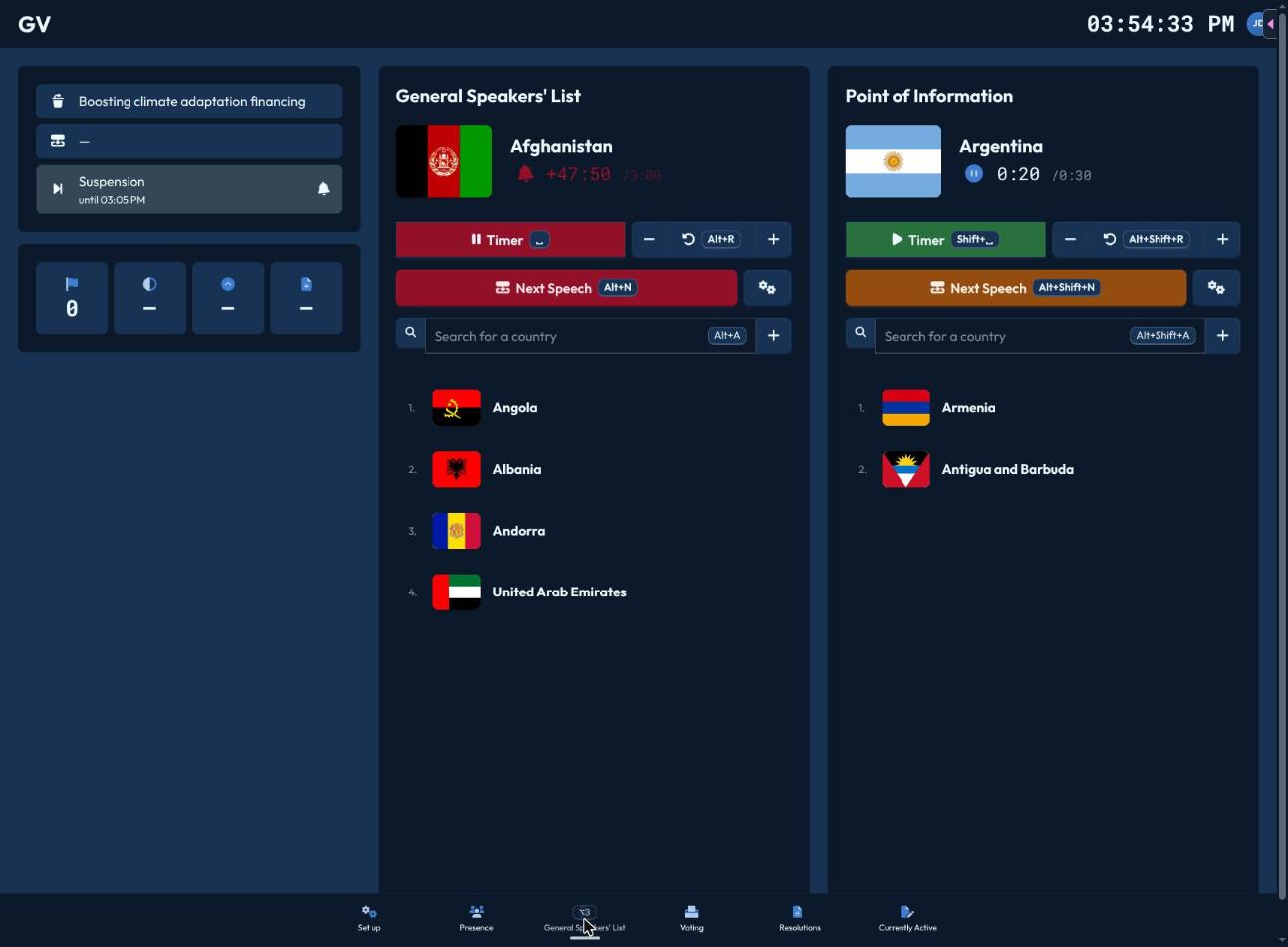
Die Redeliste-Seite (Alt+3) zeigt die Redeliste und eine Warteschlange für Fragen und Kurzbemerkungen, jeweils mit identischen Bedienelementen.
Redner:innen hinzufügen
Klicke auf Redner:innen hinzufügen (Alt+A für die Hauptliste, Alt+Shift+A für Fragen und Kurzbemerkungen), um Delegationen, NA-Akteure oder UN-Akteure nach Namen zu suchen — wer aktuell nicht als anwesend markiert ist, wird ausgegraut. Wähle eine Person aus, um sie ans Ende der Warteschlange zu setzen.
Den Timer bedienen
- Die große Schaltfläche Zeit (Leertaste / Umschalt+Leertaste) startet und pausiert den Countdown für die aktuelle Rednerin bzw. den aktuellen Redner.
- Passe die Zeit in 10-Sekunden-Schritten nach oben oder unten an.
- Zurücksetzen (Alt+R / Alt+Shift+R) setzt die Zeit auf die eingestellte Redezeit der Liste zurück.
Wird der Timer der Hauptliste gestartet, synchronisiert sich der Timer der Liste für Fragen und Kurzbemerkungen automatisch, sodass beide nie gegeneinander laufen.
Die Warteschlange weiterschalten
Nächste Rede (Alt+N / Alt+Shift+N) entfernt die aktuelle Rednerin bzw. den aktuellen Redner und wechselt zur nächsten Person, wobei der Timer zurückgesetzt wird. Sind für die aktuelle Rede noch Fragen und Kurzbemerkungen offen, warnt CHASE dich zuerst — „Alle verbleibenden Fragen und Kurzbemerkungen werden verworfen“ — da das Weiterschalten diese löscht.
Überziehung
Sobald die Redezeit einer Person auf null läuft, blinkt die Liste mit dem Hinweis „Redezeit überschritten!“, damit du weißt, dass du zum Abschluss kommen solltest.
Weitere Optionen
Das Zahnrad-Symbol öffnet:
- Sperren/Entsperren — schließt die Liste für neue Selbsteintragungen, ohne bereits Wartende zu entfernen.
- Name ändern — überschreibt, wie der Name der aktuellen Rednerin bzw. des aktuellen Redners angezeigt wird.
- Redezeit ändern — überschreibt die Standard-Redezeit dieser Liste nur für den Moment.
- Liste zurücksetzen — leert die gesamte Warteschlange (fragt vorher zur Bestätigung).